Backing Up and Restoring Your MySQL Database

by mtecheasy on January 16, 2011

The easiest way to backup and restore your mysql database is the following:

Backing up your database:
mysqldump -u username -p password database > backupfile.sql

– username – this is your database username
– password – this is the password for your database
– database – the name of your database
– backupfile.sql – the file to which the backup should be written.

Restoring your database:
mysql -u username -p password database < backupfile
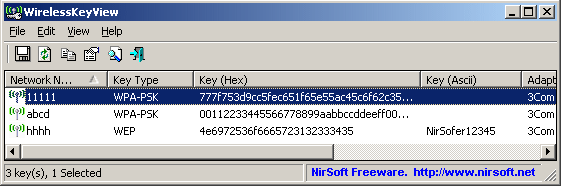
Recover lost wireless network keys with WirelessKeyView!

by mtecheasy on January 15, 2011

WirelessKeyView recovers all wireless network security keys/passwords (WEP/WPA) stored in your computer by the ‘Wireless Zero Configuration’ service of Windows XP and by the ‘WLAN AutoConfig’ service of Windows Vista. It allows you to easily save all keys to text/html/xml file, or copy a single key to the clipboard.

Download Now:  http://www.nirsoft.net/utils/wireless_key.html

The network folder specified is currently mapped, how annoying!

by mtecheasy on January 15, 2011

Do you you ever get this message?

So frustrating, here is the solution:

1. Open command prompt
2. Type <net use>

You should see a similar listing:

Status    Local     Remote                                   Network
——————————————————————————-
OK         Y:          \XXX!.Music.Sorted!         Microsoft Windows Network
OK                        \XXX!.Music.Unsorted!       Microsoft Windows Network

4. Use the following command to delete the share
net use /delete “\XXX!.Music.Unsorted!”

5. Use <net use> again to make sure it’s gone, and then re-map your drive!! Enjoy.

Write ID3v1.1, ID3v2.3, ID3v2.4, MP4, WMA, APEv2 Tags with Mp3tag!

by mtecheasy on January 4, 2011

Mp3tag is a powerful and yet easy-to-use tool to edit metadata of common audio formats where it supports ID3v1, ID3v2.3, ID3v2.4, iTunes MP4, WMA, Vorbis Comments and APE Tags.

It can rename files based on the tag information, replace characters or words in tags and filenames, import/export tag information, create playlists and more.

Mp3tag supports online database lookups from, e.g., Amazon, discogs, or freedb, allowing you to automatically gather proper tags and cover art for your music library.

Homepage: http://www.mp3tag.de/
Download: http://www.mp3tag.de/en/download.html

Installing software with Ninite is easy, simple, and fast!

by mtecheasy on December 25, 2010

Setting Up a New PC?
This is the original use of Ninite. Just go to http://ninite.com and select the apps you want, click “Get Installer”, and then run the Ninite installer .exe.

Ninite downloads and installs all your choices with no clicking Next. It even says “No” to toolbars and other junk.

Keeping Apps Up-to-Date
Ninite installers always install the latest versions of apps regardless of when they were created. This means that after you install some apps with Ninite you can keep the installer .exe around and run it again every now and then to keep those apps updated.

Ninite checks app versions before downloading and installing software. So if you already have the latest version Ninite will just keep moving down your list of apps.

Check it out: http://ninite.com/
For the linux version check out: http://ninite.com/linux/